

Showing top 0 results 0 results found
Showing top 0 results 0 results found



Every customer question carries a signal. A pricing question is purchase consideration. A "how does this work?" is someone on the fence. And when 68% of consumers have already used a chatbot for support, the real question isn't whether you need an FAQ chatbot. It's how much profit you're leaving on the table without one.
This article breaks down everything you need to know about FAQ chatbots: what they are, the different types, how to build your own FAQ chatbot, and why the best ones do far more than just answer frequently asked questions.
What is an FAQ chatbot?
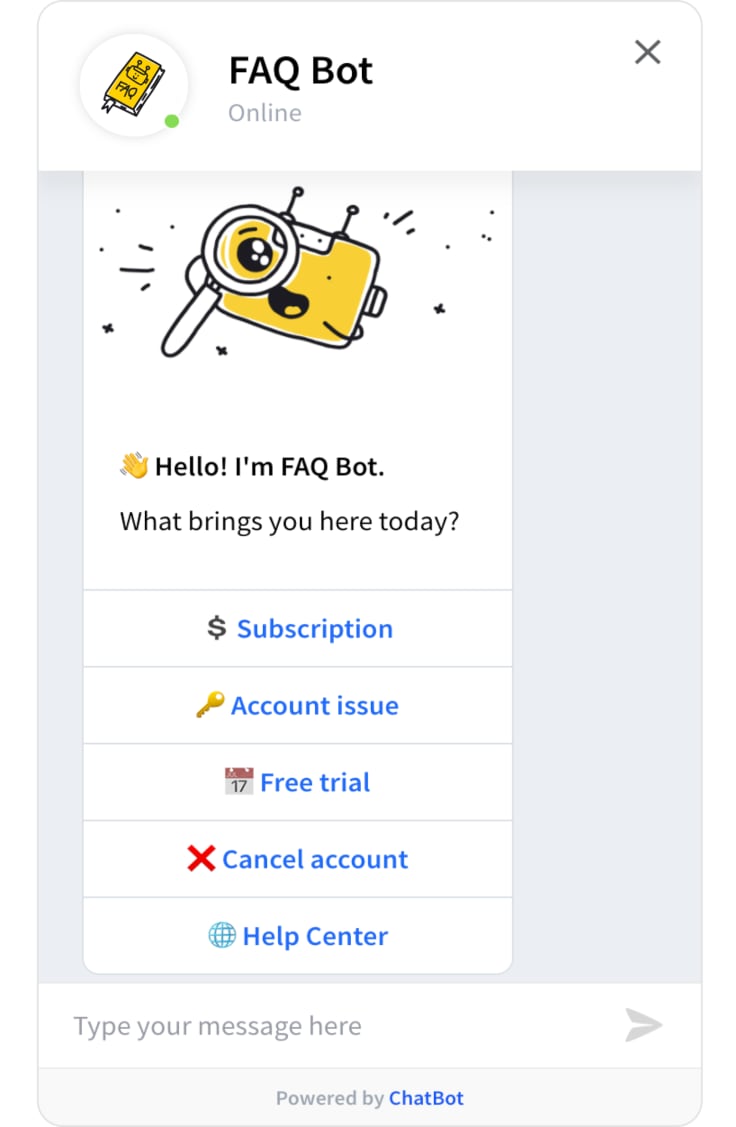
An FAQ chatbot is an AI-powered tool that answers common questions about a product or service. You'll find them integrated into web FAQ pages, embedded in messaging apps, or working alongside customer service teams in live chat platforms.
They go beyond scripted responders. Modern FAQ bots use natural language processing (NLP) to interpret user queries, understand user intent, and deliver accurate answers across a wide range of topics. Whether you call it a virtual assistant, an AI chatbot, or just "the bot," the underlying artificial intelligence makes them a versatile tool in any customer service setup.
But honesty matters here: sometimes a bot needs a human touch. Complex queries, emotionally charged complaints, or questions worded in unexpected ways still benefit from a real person stepping in.

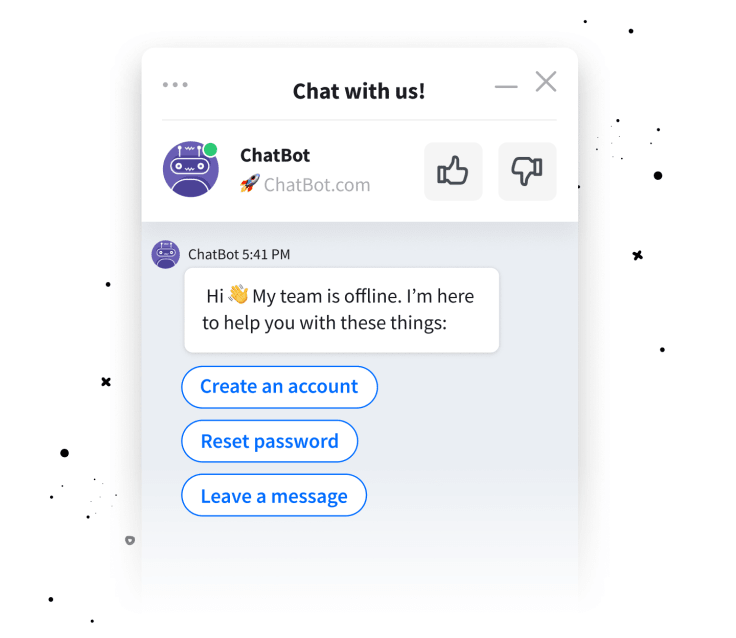
That's where a smart handoff makes all the difference. The LiveChat integration with ChatBot pairs AI-generated responses with live agents, so your support team catches whatever the bot can't. One conversation, zero dropped context.
Whether it's on your website or running through social channels like Facebook Messenger, an FAQ chatbot keeps support fast, accurate, and available 24/7.
Why use FAQ chatbots?
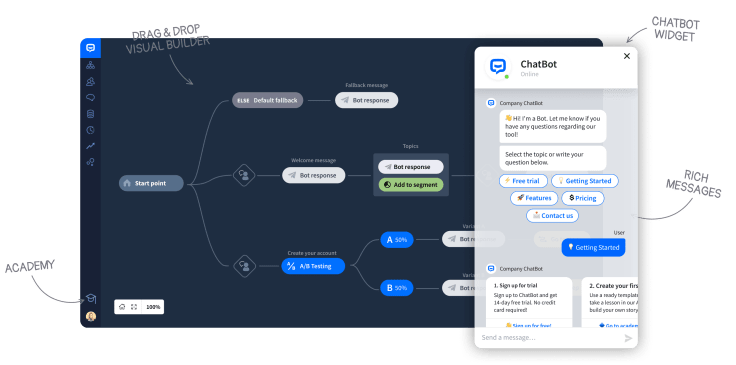
FAQ chatbots aren't just about deflecting tickets. They turn repetitive queries into structured data, free your support team for high-value customer interactions, and keep the conversation going when your office lights are off.
Cutting costs without cutting corners
Implementing an FAQ chatbot doesn't require extensive coding knowledge. Many platforms offer drag-and-drop builders that make setup quick and painless.
Once live on your FAQ page, the chatbot autonomously handles customer inquiries, significantly lightening the load for your customer service team. AI chatbots can help businesses save up to 30% on customer support costs. That's not a cost-cutting exercise; it's reallocation. Your people spend less time on "What's your return policy?" and more time on conversations that actually close deals.
Accelerating response times
Speed matters. Customers asking sales or marketing questions expect quick and accurate responses, and FAQ chatbots deliver instant answers around the clock. This 24/7 availability means your customers never wait, and your brand stays responsive even at 3 AM on a Sunday.
Turning support into a profit driver
When customers receive fast, helpful responses, it's not just their immediate problem being solved. It's an opportunity to strengthen the relationship. 89% of consumers are more likely to make another purchase after a positive customer service experience.
FAQ chatbots don't just resolve issues. They shorten the path between "I have a question" and "I'm ready to buy." That's your customer satisfaction score and your bottom line moving in the same direction.
Keeping answers consistent
Chatbots don't have off days. They deliver the same accurate responses regardless of time, volume, or the day's complexity. No mood swings, no personal biases, just uniform, error-free answers to every customer query. This AI-powered assistant maintains a calm, professional presence at all times.
Speaking your customer's language
FAQ chatbots break language barriers by interacting in multiple languages. That means personalized support for a diverse customer base, better user satisfaction, and broader market reach. No customer gets left out because of language differences.
Gathering data-driven insights
Every conversation your FAQ bot handles is a data point. It tracks which questions come up most often, where your documentation falls short, and what your customers actually care about. These engagement metrics feed directly into product, marketing, and content decisions that compound over time.
Types of FAQ chatbots
Not every FAQ chatbot works the same way. The types of chatbots available span a wide spectrum, from basic decision trees to AI that can hold genuine conversations. Here's what you're choosing between.
1. Rule-based chatbots
Rule-based chatbots follow predefined rules and guide users through structured conversations with limited topic deviation. They resolve queries quickly and predictably.
Best for: FAQ or knowledge base applications where questions are straightforward. They're fast to build, easy to maintain, and reliable for handling basic customer queries.
2. Keyword-based chatbots
Keyword-based chatbots detect specific keywords in user inputs and match them against a predefined knowledge base. They allow for more conversational, non-linear dialogue than rule-based systems.
The tradeoff? They can stumble in complex scenarios or produce redundant responses when faced with similar questions that share keywords.
3. Conversational AI chatbots
This is where it gets interesting. Conversational AI chatbots use NLP and machine learning to lead genuinely human-like conversations. Unlike rule-based or keyword-based chatbots, these AI agents understand context, remember conversation history, and adapt in real time.
They're the go-to choice for businesses that want context-aware responses and a user experience that feels natural, not robotic.
4. Generative AI chatbots
The newest category. Generative AI chatbots, powered by technologies like retrieval augmented generation (RAG), create responses on the fly using your existing knowledge bases. They don't just match answers to questions; they synthesize information and phrase it in a way that fits the conversation.
No coding required for setup. Upload your docs, your help articles, or even your website URL, and the AI agent handles the rest.
What to look for when choosing an FAQ chatbot
Picking the right FAQ chatbot isn't about grabbing the shiniest option. It's about matching capabilities to your specific business objectives. Here's what actually matters.
Comprehension and contextual understanding
Go beyond rule-based responses. Choose a chatbot that understands context and handles nonlinear queries. A customer who asks "What about shipping?" after discussing a specific product shouldn't get a generic FAQ answer. They should get shipping details for that product.
Omnichannel and site-wide availability
Your chatbot should be accessible across all touchpoints: your website, messaging platforms, and social channels. Customers shouldn't have to hunt for help.
ChatBot offers a wide range of integrations, including Facebook Messenger, Slack, and Zapier, so your FAQ bot meets customers wherever they already are.
Conversational and reasoning skills
A chatbot that can reason through complex conversations (not just pattern-match) provides a more human-like interaction. Better conversations lead to better customer engagement and stronger returns over time.
Alignment with business goals
Why do you need a chatbot? To reduce ticket volume? To qualify leads? To handle after-hours support? Your answer shapes the features you need and the budget you set. Pick a chatbot that aligns with your business objectives without paying for capabilities you'll never use.
Industry-specific requirements
Different industries have different customer support needs. An ecommerce FAQ chatbot needs product recommendations and order tracking. A SaaS FAQ bot needs onboarding guidance and account management.
ChatBot offers templates for specific industries, from ecommerce to sales. Check all chatbot templates to find one that fits your use case.
FAQ database compatibility
If your FAQ data is large and complex, you'll need a chatbot with advanced NLP capabilities. For simpler databases, a rule-based chatbot might be plenty. Match the bot to the complexity of your knowledge base, not the other way around.
Integration with communication channels
The chatbot must integrate with your existing communication stack. This seamless integration is what makes omnichannel support actually work: keeping all customer interactions synchronized and accessible in one place.
FAQ chatbot vs. FAQ page: what's the difference?
Static FAQ pages have been around forever. They work, but they have clear limitations. Here's how an FAQ chatbot compares.
FAQ pages require users to scroll, search, and self-diagnose. FAQ chatbots flip that: the customer states the problem, and the bot delivers the answer. For high-volume support, that difference in user experience compounds fast.
What are examples of FAQ chatbots?
FAQ chatbots serve two audiences: your customers and your employees. Both benefit, but in different ways.
For customers
FAQ chatbots (like the ones you can quickly deploy using ChatBot's built-in FAQ template) provide instant answers to customer queries and smooth out the entire buying journey.
But they're not just answering questions. They're also powerful tools for lead generation and nurturing. By engaging in conversations, they gather insights about customer preferences and buying signals.
That information feeds your sales team with context they'd never get from a static form: personalized messages, targeted offers, and cross-selling opportunities based on past interactions.
For employees
On the internal front, FAQ chatbots are a quiet productivity win for the onboarding process. New hires get a dynamic knowledge base covering company policies, product details, and processes, accessible without waiting for an HR rep to respond.
The result? Faster ramp-up, fewer repetitive questions clogging your team's inbox, and employees who can find answers to common queries on their own terms. Read more about HR chatbots and how they support internal teams.
Real-world FAQ chatbot examples
Businesses across industries use FAQ chatbots to handle customer questions at scale:
H&M uses an FAQ chatbot that provides personalized guidance and rapid responses about products and services, turning browsing into buying.
Norwegian Airlines runs a chatbot offering 24/7 assistance for flight searches, reservations, and travel information, reducing wait times during peak booking seasons.
Uber's WhatsApp chatbot transformed the ride-booking experience, letting customers book directly through a messaging platform they already use daily.
These examples share a common thread: the chatbot doesn't just answer FAQs. It sits at the intersection of customer service and conversion, turning support interactions into business outcomes.
How to build an FAQ chatbot
Ready to build your own FAQ chatbot? Whether you're going for a simple rule-based setup or a fully custom FAQ chatbot powered by AI, here's a practical, step-by-step walkthrough.
Step 1: Define purpose and scope
Before anything else, identify what specific tasks your FAQ bot will handle. Are you aiming to answer frequently asked questions, generate leads, handle after-hours support, or all three?
Set clear business objectives and define key performance indicators: resolution rate, user satisfaction scores, response time. These metrics will tell you whether the chatbot is working or just occupying space on your website.
Step 2: Choose the right chatbot platform
Look for a platform that offers easy setup (no extensive IT knowledge required) and lets you choose between rule-based and AI-driven approaches.
ChatBot scans your website, help center, or any designated resource to provide quick and accurate AI-generated answers to customer questions. It learns from your own business data, so the responses feel native to your brand, not generic.
Also check for seamless integration with your existing tools. A chatbot that works in isolation is a chatbot that creates friction.
Step 3: Build your knowledge base
This is where your FAQ data lives. Collect your top customer queries, organize them into categories, and create clear, concise answers for each.
You can upload existing PDFs, manuals, CSV files, or website URLs to automatically train the bot. The goal is a comprehensive knowledge base that covers common queries without gaps.
Step 4: Integrate across channels
A chatbot on your website alone isn't enough. Integrate it with your live chat, messaging apps (WhatsApp, Facebook Messenger), and any other channels your customers use.
Look for a platform that supports multi-channel deployment so your FAQ chatbot provides consistent answers regardless of where the conversation happens.
Step 5: Personalize the experience
Customize your chatbot's tone, language, and personality to reflect your brand. A chatbot that sounds like your company builds trust. One that sounds like a generic bot builds frustration.
You can set up personalized messages based on user behavior, create different conversation flows for different customer segments, and even adjust the chatbot personality to match your brand voice.
Step 6: Test, launch, and iterate
Test your FAQ chatbot with real user queries before going live. Monitor user feedback and engagement metrics after launch. Use conversation history to identify gaps, then update your knowledge base.
The best FAQ chatbots aren't built once and forgotten. They improve over time through regular updates, user feedback analysis, and performance monitoring.
Balancing cost and features
Many platforms offer free or low-cost rule-based chatbots. But for more complex queries and genuine conversational AI, an AI-powered FAQ chatbot like ChatBot provides long-term value through machine learning and natural language processing that improves with every interaction.
Try ChatBot free for 14 days and see the difference yourself.
Automate your FAQs with ChatBot
Improve your customer support and boost efficiency with ChatBot's FAQ module. It's built to quickly address common queries about your products and services using advanced AI.
Managing questions and answers is straightforward. Customers receive quick and accurate responses, keeping customer satisfaction high and your support team focused on more complex requests.
Setting up your FAQ chatbot works like this: input your questions and their answers, and the chatbot handles delivery. For more complex queries, the AI knowledge module paraphrases responses for clarity and relevance.
Here's how to get started:
Access the module: Open the ChatBot Story you want to use. Select a FAQ block from the menu.
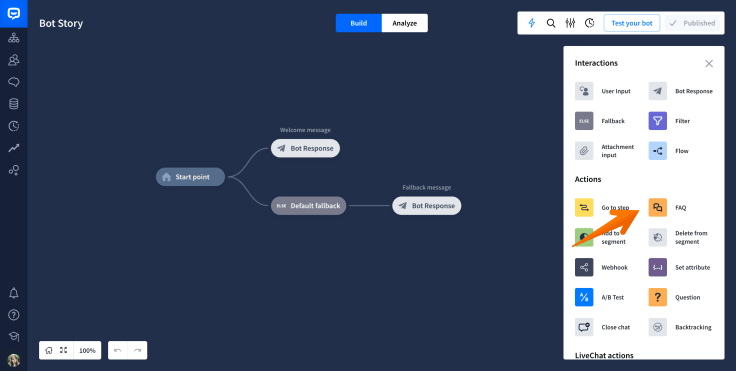
Choose a category: In the FAQ section, pick a category from the left panel for organization.
Add a question: Click "Add question" and populate your FAQ module.
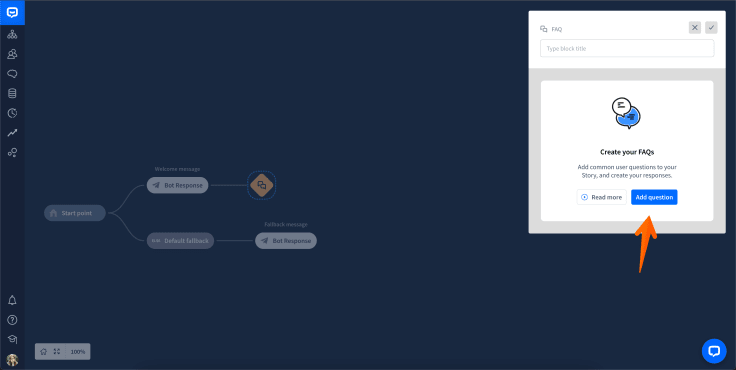
Input question and response: Enter each question and its answer. Edit or remove questions anytime with a simple click.
Save automatically: Questions are saved instantly. No extra steps needed.
Expand your FAQs: Add more questions or categories as your FAQ data grows.
ChatBot also offers a ready-to-use FAQ template, perfect for 24/7 customer service, handling subscription queries, resolving account issues, and more. It integrates into your website or messaging platforms, requires no coding skills, and can be customized to fit your brand.
Benefits of FAQ chatbots: the full picture
Still weighing whether an FAQ chatbot is worth the investment? Here's what the data and real-world implementations consistently show.
Automating responses saves real money. Up to 30% in customer support costs, according to IBM. That's budget you can redirect toward growth, not just maintenance.
Customer satisfaction goes up. Instant answers to customer questions mean shorter wait times and faster resolutions. Customers who get fast, accurate help are more likely to return and more likely to recommend you.
Your support team gets better, not smaller. FAQ chatbots handle repetitive queries so human agents can focus on complex conversations that require judgment, empathy, and creativity. Automation frees people to do their best work.
Consistency at scale. Whether it's the first customer inquiry of the day or the five-hundredth, the FAQ chatbot delivers consistent answers with zero drift.
Multilingual support for a global customer base. FAQ chatbots interact in multiple languages, broadening your reach without multiplying your headcount.
Better data, better decisions. Every interaction generates user feedback and engagement data. Over time, your FAQ chatbot becomes a source of insight into what your customers actually need, where your product confuses them, and what questions predict a purchase.
Implementing FAQ chatbots: best practices that actually matter
Getting an FAQ chatbot live is one thing. Getting it to perform well is another. Here are the practices that separate effective FAQ chatbots from the ones customers learn to ignore.
Start with your highest-volume questions
Don't try to cover everything on day one. Pull your top 50 customer questions from support tickets, chat logs, and email. Build your FAQ chatbot around those first, then expand. This gives you immediate ROI while you refine the experience.
Write answers the way people talk
Your knowledge base should sound like a helpful colleague, not a legal document. Keep answers short, direct, and action-oriented. If the answer to "How do I reset my password?" takes four paragraphs, rewrite it.
Set up human agent handoff from the start
Even the best AI FAQ chatbot will encounter questions it can't handle. Complex queries, unusual edge cases, emotionally charged situations: these need a human. Configure your chatbot to recognize when it's out of its depth and hand off seamlessly to your support team, with full conversation history preserved.
Track the right metrics
Resolution rate, user satisfaction, time-to-resolution, and escalation rate are the numbers that matter. Page views on your FAQ chatbot don't tell you much. Whether it's actually resolving customer inquiries does.
Review conversations regularly
Your FAQ chatbot's conversation history is a goldmine. Review it monthly to spot patterns: new questions emerging, answers that confuse users, topics where escalation rates spike. Use these insights to update your knowledge base and refine the bot's responses.
Keep the knowledge base fresh
Products change. Policies change. Pricing changes. If your FAQ chatbot is still answering based on last year's information, you're creating more problems than you're solving. Schedule regular updates to keep responses current and accurate.
Making FAQ chatbots work across your organization
FAQ chatbots don't have to live exclusively on your customer-facing website. Smart teams deploy them across multiple internal and external touchpoints.
Customer support: The obvious use case. Answer frequently asked questions, qualify issues, and route complex conversations to the right human agents.
Sales enablement: When a prospect asks about pricing, features, or compatibility, the FAQ chatbot can deliver accurate answers and capture contact information for follow-up. Every answered question is one step closer to a closed deal.
Internal helpdesk: IT teams, HR departments, and operations groups all deal with repetitive queries. An internal FAQ bot reduces the load and gives employees instant access to the information they need, whether it's about PTO policies or VPN setup.
Onboarding automation: New customers and new employees both benefit from guided, self-service FAQ experiences. The chatbot walks them through common questions at their own pace, freeing your team from repetitive walkthroughs.
The common thread? FAQ chatbots work best when they're embedded where questions naturally arise, not tucked away on a page nobody visits.
Launch your FAQ chatbot and start closing gaps
FAQ chatbots have evolved well beyond simple rule-based tools. In 2026, the best implementations combine conversational AI, generative AI, and real-time knowledge updates to handle everything from basic common queries to nuanced, context-aware conversations.
The businesses getting the most out of FAQ chatbots aren't treating them as ticket deflectors. They're using them as the first touchpoint in a support experience that drives customer engagement, uncovers buying signals, and builds loyalty.
ChatBot makes it easy to get started. No code, no complex setup. Upload your FAQ data, customize the experience, and launch an AI agent that works around the clock across every channel your customers use.
Your support conversations are full of profit signals. Stop leaving them unanswered.
Try the platform for free and see what happens when your FAQ chatbot starts earning its keep.